Any professional who works at creating, managing, or marketing a website understands how important digital assets are in their work. Digital assets are electronically stored data that come with the right to use, bring value to their owners, and are uniquely identifiable. Examples of digital assets include audio files, PDF white papers, graphics, photos, HTML documents, and presentations.
Web professionals can use these assets to help educate people on a topic, improve a company or organization’s digital presence, and market products or services online. However, as the number of stored digital assets grows at an organization, it becomes time-consuming and difficult for different web professionals to manage and retrieve assets.
A digital asset management (DAM) solution is a type of software that helps web professionals properly store, update, index, and retrieve their digital assets. The demand for dedicated DAM tools is expected to surge over the coming years, and recent research predicted the global DAM market to reach $8.1 billion by 2024.
Read on to find out the types of DAM available, the service models you can implement when using DAM systems, and some specific use cases of DAM software for web professionals. You will also get some tips and best practices for getting the most out of any DAM solution.
Types of Tools
There are three main types of Digital Asset Management tools; however, many enterprise solutions can be classified and used as any single one or as all of these types simultaneously.
Library asset management focuses
on building an organized digital library of infrequently changing assets for
easy storage and retrieval.
Production asset management meets
the needs of web professionals who need to collaborate on, control and use
digital assets that are frequently updated and revised.
Brand asset management entails
using and reusing marketing materials, logos, and other assets that help to
build brand identity.
Software Service Models
There are two main service models for implementing Digital Asset Management:
On-premise DAM solutions are installed locally on an organization’s servers. Everything is kept in-house and users typically access assets via the internal corporate network.
Cloud DAM solutions are hosted on external web servers and the software is accessed through a web browser via an Internet connection.
On-premise DAM systems are better suited for web professionals whose roles involve stringent data security obligations, such as people working in government departments and highly regulated industries. A cloud DAM is a cheaper, more flexible solution that can also facilitate the needs of distributed teams and remote workers.
Benefits of DAM for Web Professionals
Web professionals work in a wide range of roles, but here are some general benefits of DAM software for all web professionals:
DAM software reduces time spent
looking for assets, improves workflows, and facilitates quick repurposing of
digital assets. The result is greater productivity.
By building a central repository
of digital assets and using versioning controls, DAM provides asset consistency
and facilitates collaboration for web professionals.
DAM software tracks the usage
rights associated with assets, which can help reduce the risk of copyright
issues from improper asset use. For example, there might be restrictions in how
you use purchased stock photos.
Cloud and on-premise DAM software
typically come with access control, meaning you can secure your most sensitive
assets and make sure that the only people with access to them are those who
need such access to do their jobs.
Best Practices When Using a DAM System
DAM offers many benefits for web professionals but how you use your chosen tool can make a huge difference. Here are some best practices for getting the most from DAM software.
Metadata is Critical
Metadata is information about your assets. Your DAM software is only as good as the metadata you store with each asset. There is a balance between too much metadata and too little. You need to enter the most important information about every asset you wish to catalog because metadata is what turns a piece of digital data into an easily searchable and retrievable asset. You should also have a policy to enter metadata into the system as soon as you upload a given asset. Procrastination leads to an inefficient setup that makes it hard to find assets.
Specify Usage Terms
Assets rights issues can easily emerge when an asset has been stored without reference to its usage rights. For all rights-managed assets, it’s imperative to specify the usage terms in their metadata.
Leverage Analytics
DAM software often comes with advanced tracking and analytics features. You can use this information to your advantage, for example, marketers can identify the asset categories that bring the most ROI to your organization. You can also use the analytics to identify assets or collections of assets that are most frequently used and try to make such assets more easily discoverable.
Assign an Administrator
Particularly in large organizations, it is prudent to have a dedicated DAM administrator. This person can manage access controls for different users and ensure user roles and permissions are kept current. The administrator should also be responsible for creating and deleting users from the system.
Train Users
When you adopt a DAM system, it’s a good idea to set up a dedicated half-day of training that teaches different web professionals in your organization how to use your chosen software. If you avoid training users, they will need to learn on the job, which can lead to a lot of frustration and lost productivity.
Conclusion
The expected growth in the DAM software market reflects the growing influence of digital assets in the daily work of various web professionals from designers to marketers to website copywriters. Cloud DAM solutions have emerged as a lower cost alternative service model for DAM, however, on-premise systems are still the standard for professionals in government departments and highly regulated sectors.
Editor’s Note: This sponsored content was provided by Gilad Maayan (Developer Community Advisor) at Agile SEO.
After a long break let’s take a look at another Static Generator – Hexo.
Hexo is powered by Node.js and is mostly aimed at blogging. It has a deploy integration for GitHub which makes it a great fit to build a documentation site for a GitHub project as well. If you are a JavaScript developer, the setup should be relatively easy. Like many other general purpose generators, you’ll probably want to write your content in Markdown. The default templating engine is Swig, which is once again well suited for JavaScript developers. However, Hexo is extensible to allow other templating engines to be used if you want.
The Hexo website includes a range of pre-built themes for you to try out, and one especially popular feature of the tool is its support for single-command deployment.
Installation of Hexo
Installing Hexo is quite
easy. However, you do need to have a couple of other things installed first:
We reviewed static site generators when we began this series of articles. If you need a quick review – a static site is a collection of pages contained in basic HTML files. A static site generator (SSG) is a compromise between using a hand-coded static site and a full CMS. You generate an HTML-only website using raw data (such as Markdown files) and templates. The resulting build is transferred to your live server. Static site generators are systems that compile templates into static HTML pages. There is no server processing or rendering, so static websites tend to be very fast and lightweight, saving you and your users precious time and bandwidth. This increased efficiency is reflected in lower costs (including lower maintenance costs) and, potentially, higher revenues.
What is the difference between WordPress and Hexo?
When talking about performance, one must think about caching. Although there are multiple techniques for caching WordPress, this is not usually a straightforward task, unlike caching static files. Serving cached files is more performant than serving actual files from the server and it can save time when loading websites.
Advantages of Hexo
Hexo has
many pros:
it is blazing fast,
it is easy to deploy to GitHub pages or any other host with one deploy command,
it is powerful with solid Markdown support,
it is highly extensible,
it is open source and there are many open source themes, and
there are available free plugins.
With Hexo, one can create markdown files and HTML layouts which will be converted to static HTML files when deployed. Hexo provides a deploy configuration which builds our static files into a GitHub branch. This means one can maintain documentation as markdown in our project’s master branch and deploy it, with one command, to gh-pages.
My experience working with Hexo
I decided to create a blog post for Hexo without any graphics. I found creating the blog post in Hexo to be easier than Jekyll. Readers may recall that I discussed Jekyll as part 2 of this series. The default theme also looks good on the site. I decided to just run the site locally. If time permits, I may post some of these examples on a Web Professionals server and link to them. In the interim, here is a screen capture of the results. I did not encounter any major issues when working with Hexo locally.
Example of Hexo blog post
Final Thoughts
During my course of study as a Web Developer I tried many CMS systems and installed a lot of software. I found working with Hexo a little easier than most. It also has a little learning curve. One must use the command prompt to run different commands. I was able to get desired output to display locally with not that much effort. Each time I made changes I had to run ‘hexo server’ command on command prompt. That is the essence of static site generators (one must remember to constantly update the resulting web pages when changes are made).
One may find it simple and easy to build sites using Hexo or one may face problems initially installing and running and deploying. It all depends how the computer configuration/set up is. I am curious as to your experiences with Hexo. What did you like/ dislike? Please update the comments with your experiences.
30 years ago this week (March 11, 1989), Tim Berners-Lee submitted his proposal for an information management system. A lot has happened since that initial proposal. Without a doubt, the WWW has had a significant impact on our society. Personally, I have been learning about web technologies since 1992 (27 years). I am amazed at the scope and scale of changes I have witnessed in nearly three decades. Our organization was founded in 1997 (this April will mark 22 years for us). And, we have witnessed profound changes over that time as well.
Renew our focus on core principles
In the past 30 years, the WWW has morphed into what we know today. There are growing divides and these have been discussed in the open letter written by Sir Tim Berners-Lee on March 11, 2019.
We believe it is time for governments, companies, and citizens to formally commit to the principles outlined in the Contract for the Web. The key points outlined in this contract are cited in the bullet points below:
Governments should:
provide access to the web and Internet for everyone,
make certain the web and Internet is available all the time and all content is available,
recognize and respect the fundamental right to each individual’s privacy.
Companies should:
keep the web and Internet access affordable and accessible to everyone,
respect the fundamental right to each individual’s privacy (and personal data),
support technologies which put people first.
Citizens should:
create content and collaborate,
foster strong communities where everyone feels safe and welcome,
do their part to keep the web open and public.
We signed, did you?
As a member supported organization helping aspiring and practicing web professionals, we have always adhered to the core principles discussed in the above letter. We have signed the Contract for the Web to reaffirm our commitment. We signed as an organization and we encourage members and others reading this to sign as well.
The WWW has created many opportunities and we are at a key point in the evolution of this medium. As an organization, we support continued efforts to create the web we want. We encourage all to do their part.
Best always,
Mark DuBois
Executive Director and Community Evangelist
Technology has impacted our lives on a larger scale, including our health. From doctors to patients, everyone has adopted the digitization of health industry. And this adoption has given rise to healthcare mobile app development. Undoubtedly, the demand for mobile apps in the healthcare sector is constantly increasing. Medical apps or mhealth apps have brought revolution in the way patients receive care and how patients communicate with providers.
Healthcare mobile apps made patients empowered to take their own, fully-informed medical decisions. It not only provides them with more knowledge but also increases patients’ involvement. Whether it is the healthcare provider or patient, mhealth app developers took the initiative to level the playing field for everyone.
Let’s have a look at how mhealth apps are transforming the healthcare industry.
With the help of mhealth apps, healthcare providers can cater to medical emergencies as well as offer enhance patient care. These apps are slowly becoming a significant part of the patient-provider lifestyle. It comes handy in a lot of medical procedures such as viewing blood reports and medical prescriptions, tracking patient recovery, and monitoring disease symptoms. Digital prescriptions allow providers to treat and monitor patients on the go.
Benefits of Healthcare Mobile Apps
Some of the biggest concerns of patients while accessing healthcare services are the cost of medical and health insurance and keeping pace with the technology. Healthcare mobile app development addresses these concerns and improves patient-provider communication. Even though health is a priority for everyone, but visiting hospitals frequently for regular checkups or follow-ups doesn’t count as a feasible option. Mobile technology brought relief to this problem. Here are some of the benefits of healthcare mobile apps:
Easy care access: mhealth apps let providers communicate with the patients in a better way. It reduces the distance between them and improves the patient-provider relationship. Mobile apps let patients take consultation over platforms and visit only as recommended. This will not only save patients and providers’ time but also cut a significant cost.
Improved patient engagement: The long queues outside the doctors’ clinic leaves a very limited time for providers to treat every patient warmly. In addition to this, it lacks the transparency of cost and quality. Healthcare apps work the best for patients, as it informs them if there is any delay in the appointment or they want to fix an appointment in the real time.
Additionally, mhealth apps are beneficial for working professionals and elderly who don’t get updates regarding upcoming doctor appointments or pill schedule. These apps work as an assistant for patients, reminding them to take pills and scheduled appointments as required.
No More Medical Fraud: With healthcare apps, there would be no more Medicare fraud. Often, patients get mislead by brokers present in the hospital who fool them saying that they will fix their appointment and charge a hefty amount to the medical staff. mhealth apps let patients access healthcare services without any mediator. Additionally, patients are also able to book their appointments directly with the doctor through the app and get genuine bills.
Round the clock service: Healthcare mobile apps offers 24*7 assistance to patients and providers. Generally, when patients are done with consultations, they are left with paper, prescribed medicines, and recommended treatment. This way, there are higher chances that patients may miss the key points mentioned by doctors during treatment.
In such situations, healthcare apps come as a handy solution. It can help patients remember even the minute detail and the important instructions from providers such as taking pills, checking side effects, and contacting a doctor immediately in case of emergency.
Role of mobile apps in the Healthcare Sector
When it comes to healthcare, it becomes mandatory for healthcare providers to make quick decisions and implement those decisions timely to save patients’ lives. An efficient IT infrastructure is necessary for the providers to make prompt decisions. Here healthcare mobile apps can ease-down the decision-making process.
Mobile technology has proven helpful for doctors and nurses. It enables them to check patients’ health records in the real-time and patients can monitor their health conditions too. It also helps policy-makers to further improve as well as create new healthcare programs.
Here are some tips to develop a Successful Healthcare Mobile App
Determine your target audience: Determining who you are going to provide your services is one of the most crucial factors to consider while developing a healthcare app. Explore as much as you can on your targeted user-base.
Understand the need/problem: Once you know your target audience, determine what problems they are facing and how can you solve it. There might be many apps available in the market that claim to solve the same problem but hardly people find those appropriate. As a healthcare app developer, you must provide a solution that offers an easy-to-use experience to your users and solves their problems efficiently.
Customize as required: Your solution should be customized as per patients’ needs. It should provide information to the users, specific to their queries and with which they can relate to.
Direct Communication: Your healthcare app should offer a direct communication medium between patients and their doctors as it helps patients understand their health state. The medium can be in any form: messages or email.
Earlier, it was necessary for the patients and doctors to be in the same place for the treatment. With the advent of healthcare mobile apps, this limiting requirement has been addressed and solved as patients can take consultation, book appointments and tests, and take proper follow-up virtually within the app. These apps are like a blessing for the people living in rural areas and face difficulty in connecting with professional doctors.
Key Take Away!
As you have learned about how the intervention of technology with healthcare gave rise to healthcare mobile apps, its benefits, and a few tips to build a successful healthcare mobile app. It is evident from the above discussion that the upcoming years are going to be great for the healthcare providers and patients as there will be better solutions and many options to choose from, in order to solve a problem.
Whether it is a patient or a healthcare provider, there are numerous advantages for everyone. If you are thinking about developing your own app then it’s the right time to do it. All you need is a skilled team of an experienced digital healthcare technology partner, medical app developers, and digital marketers.
Editor’s note. This sponsored content was provided by Ritesh Patil.
Ritesh Patil is the co-founder of Mobisoft Infotech that helps startups and enterprises in mobile technology. He loves technology, especially mobile technology. He’s an avid blogger and writes on mobile application. He works in a leading mobile app development company with skilled Android and iOS app developers that has developed innovative mobile applications across various fields such as Finance, Insurance, Health, Entertainment, Productivity, Social Causes, Education and many more and has bagged numerous awards for the same. You can find him on Twitter and LinkedIn.
Jekyll remains the most widely used static site generator. With Jekyll, you’ll typically work with content in Markdown, a lightweight markup language designed for text formatting. The Liquid templating engine is used to place this Markdown content into the HTML template, and to combine templates representing various parts of a page (say, header, footer and content) in a modular and re-usable manner. It also has support for Sass for those with a preference for CSS pre-processing, and it’ll play fine with libraries like Bootstrap. Also included with Jekyll is an HTTP server which can be used to easily deploy and test your static pages locally.
Importers is a feature which enable an existing site to be migrated to Jekyll with relative ease. For example, you can take an existing WordPress site as a starting point with Jekyll using one of the importers.
If you have a GitHub repository, you’re able to create a GitHub pages site for free using Jekyll. This can be a convenient way to give a polished landing page to your GitHub project.
The big downside of Jekyll – and this applies to most generators – is that it can seem complex at first and is a new technology to master.
You first need to install the Ruby DevKit or you will experience errors. If you are installing Ruby only for the purpose of running Jekyll, Portable Jekyll will give you a full working Jekyll install in less than 5 minutes.
Few easy steps:
To set up your site locally with Jekyll, follow these steps:
Create a local repository for your Jekyll site.
Install Jekyll using Bundler.
(optional): Generate Jekyll site files.
Build your local Jekyll site.
Keep your site up to date with the GitHub Pages gem.
Configure Jekyll.
Does Jekyll generate valid HTML?
Jekyll essentially a parser that converts plain text content written in a special formatting language called Markdown into HTML. These content blocks get inserted into one or more templates to build final output for a static page or a post. Markdown is a styling language used to prepare written content such as blog posts in Jekyll that can eventually be converted into HTML. Markdown allows user to focus on content by using an easy-to-read and easy-to-write plain text format, which can then be converted to valid HTML.
My experience working with Jekyll
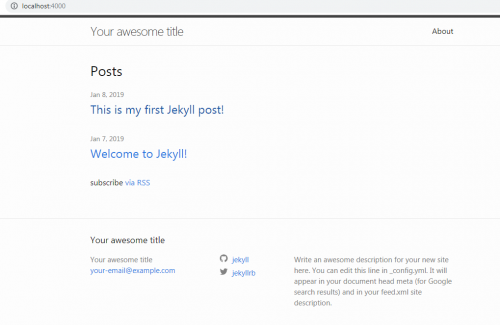
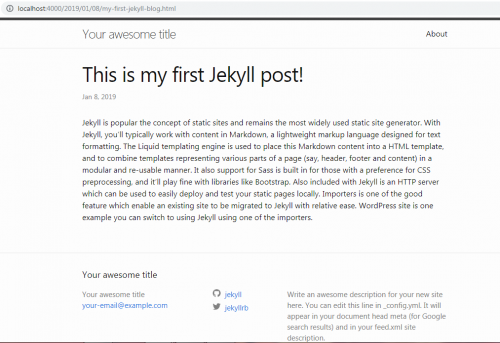
Jekyll is widely used Static Generator. I tried working with Jekyll. I followed easy steps to install and run a Jekyll post locally. I first installed Ruby, then used the command prompt to get the desired Jekyll output locally.
Here are some screen captures to get an idea how the site look like. It is a simple blog post without any graphics.
I transferred all generated files and also post I created via FTP to a server. It didn’t give the desired output shown in above images. For example, the link to the CSS file appears to be broken upon transfer.
During my course of study as a Web Developer I tried many different CMS and installed different software, but working with Jekyll is little different. It has a bit of a learning curve and I think someone before working may need someone to have a little technical background. I am still trying to see what I need to change in the background code when it is transferred to a server. Clearly, something did not work properly.
These are my initial observations on using the tool. You may have different experiences and we look forward to your comments. The biggest issue with using any static generator is that you must generate the entire site each time you make updates (so all the links work). You would then need to transfer the appropriate files to the server each time. In my opinion, there are other tools (such as WordPress) which would seem to be more efficient (although less secure as they interact with a database).
As we begin 2019, we think this is a good time to focus again on the issue of privacy (especially as it relates to web applications). In a nutshell, one can think of privacy as the ability to control information about an individual or a group. This includes how the information is collected, shared, and used.
Last year, the European Union began enforcing GDPR (General Data Protection Regulation) on May 25. This legislation is designed to “Reshape the way organizations across the region approach data privacy.” (Quote from https://eugdpr.org/). This represented a major improvement (in our opinion).
We can think of many instances where details are collected (often without full consent) and shared with others. If you have been paying attention to the news in the past few years, you already know this is an issue.
As a professional organization, we encourage adherence to privacy principles which include:
Never collecting more information than is necessary to complete a given task.
Keeping collected information confidential (and not sharing with other organizations without your specific permission).
We published our views on privacy on June 1, 2018. We ask that web professionals (and those who aspire to our profession and craft) take time to evaluate their role in protecting privacy as we begin 2019. We contend the U.S. lags significantly in the area of privacy protection (at least protection “with teeth”).
We are interested in what our readers and members think about this issue and look forward to your comments.
Best always,
Mark DuBois
Executive Director and Lead Community Evangelist