
by Harshala | Oct 12, 2018 | Analytics, Industry News, State of the Web, Web Design
What is Artificial Intelligence (AI)?
Artificial intelligence (AI) is the ability of a computer program or a machine to think and learn. It is also a field of study which tries to make computers smart. As machines become increasingly capable, mental facilities once thought to require intelligence are removed from the definition. Artificial intelligence (AI) is an area of computer science that emphasizes the creation of intelligent machines that work and react like humans. Some of the activities computers with artificial intelligence are designed for include: Speech recognition and learning.
Why is AI important?
Artificial Intelligence is the machines which are designed and programmed in such a manner that they and think and act like a human. Artificial Intelligence becomes the important part of our daily life. Our life is changed by AI because this technology is used in a wide area of day to day services.
(more…)
by Harshala | Oct 5, 2018 | Employment Issues, Industry News
What do we mean by employment trends?
A pattern of gradual change in a condition, output, or process, or an average or general tendency of a series of data points to move in a certain direction over time, represented by a line or curve on a graph.
This week’s blog we will seeing the latest trends in the employment (particularly for web professionals).
10 Workplace Trends in 2018
Dan Schawbel provided a forecast for the Top 10 workplace trends for the upcoming year. His purpose is to help prepare organizations for the future by collecting, assessing and reporting the trends that will most impact them. Obviously, most of these impact many industries (not just web professionals).
The top workplace trends for 2018 include:
- Leaders encourage more human interaction
- The next wave of learning credentials
- Companies focus on upskilling and retraining current workers
- Artificial intelligence becomes embedded in the workplace
- Financial and mental wellness get prioritized
- Employee burnout causes more turnover
- Workforce decisions sway consumer behavior
- Companies take diversity more seriously
- The deregulation of labor laws
- The aging workforce
(more…)
by Gary Stevens | Sep 21, 2018 | Industry News, User Experience
Internet users want a speedy experience and they’re not getting it, a fact that leaves them frustrated and website owners with less revenue. Don’t believe it? Numbers don’t lie. A full 53 percent of surfers want any site they visit load in three seconds or less. The largest ecommerce sites in the world recognize this necessity – they load incredibly fast. Most of the rest of the internet leaves a time gap that makes for a lot of gritted teeth and nervous toes tapping the floor. The good news is that speeding up a slow website is not difficult or time-consuming. The bad news is you might not choose to do it.
Are You Flirting with the Performance Poverty Line?
The performance poverty line is a term that represents the point at which being slow doesn’t matter because you’ve already lost most of your traffic. That number sits at around 8 seconds. The more pertinent question is, do you know your website’s speed. REALLY know your website’s speed?
No guessing because this is important stuff.
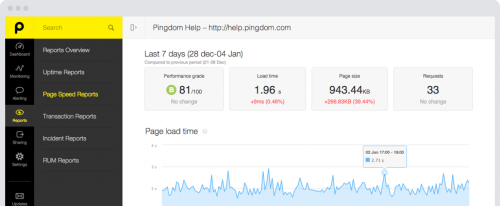
There’s an easy way to find out. Pay a visit to a website called Pingdom — it’ll probably load fast because it’s sort of their business — and enter your URL in the box. Select a location from the dropdown menu and hit “start.” Unless they’re exceptionally busy (it happens sometimes) you should get a performance summary in less than a minute.
There’s a good chance what you see won’t impress anyone, but that’s okay. Few websites do. We’re here to provide you with a road map to get those numbers headed down, down, down and your visitors to start getting happy, happy, happy. Let’s call this…
A 6-Part Roadmap to Fast Websites and Happy Customers
Part 1: Magically Shrink Your Website
Actually, as far as we know, there’s no way to magically shrink your website but you can get the same effect by applying a sweet little bit of technology called Gzip compression. When implemented, some site owners have seen overall file size reduction of as much as 70 percent. That’s huge. Actually it’s tiny and that’s the point. It works like this. When a request hits the server to view the website, it automatically zips all the files before sending them onto the requester’s browser, where it is unzipped and displayed.
Part 2: Fix Bad Design and Too Many HTTP Requests
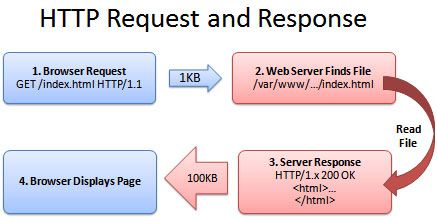
Every element on your website — we’re talking about images, videos, scripts, and even text — generates an individual request to the server. The more “stuff” your website has, the more requests there are and the longer it takes to load. If ever there was an argument for using a minimalistic approach when designing your website, this is it. Fewer requests mean a faster website. The tricky part is to not get distracted by all things you could do and stick to only what is needed to accomplish the site’s mission.
Part 3: Put Hefty Images on a Diet
Images are huge. Incorrectly (or not at all) optimized, they put a terrible strain on bandwidth and leave the server and browser gasping from the strain. While we could write a book on the topic, there is one thing you can do that will fix a lot of the issues and that is choose the correct format — png, gif, and jpeg are good — and make the things as small as you can stand BEFORE uploading to your website. If you upload a full size image, even if you reduce it later, the server still has the original version and that’s the one that clogs the pipeline.
Part 4: Upgrade Your Hosting
We love cheap stuff as much as the next person but when it comes to choosing a web hosting plan, you need to understand the different types of plans and know when it’s time to upgrade. Inexpensive shared plans can be as low as a few dollars a month and that’s okay for a hobby or site that doesn’t have much traffic yet. Once you reach a certain level, though, the shared resource approach of this kind of plan will almost certainly mean slow-loading and downtime. While a dedicated server might not be worth the expense, a virtual private server or VPS hosting can be a great compromise.

Part 5: Turn on Browser Caching
Browser caching is an easy-to-implement, tactic that most fast-loading websites use. The idea is simple. Rather than force the server to send over all the website files every time someone visits, static files (those that don’t change) are stored in the browser’s temporary memory and only dynamic files have to be retrieved. Obviously, this doesn’t help on a first visit but, with browser caching enabled, subsequent visits will be quicker. For WordPress websites, W3 Total Cache is a free plugin to look for. Others just require a simple code addition.
Part 6: Resolve Plugin Conflicts
This WordPress-specific advice is based on the reality that a lot of site owners install plugins that they never update or even use. Considering the third-party nature of these bits of software, it should be no surprise that they don’t always play nice together — they weren’t intended to. If your WordPress website is slow or buggy, one of the first actions to take is to uninstall any plugins you aren’t using. After that, turn what’s left off one at a time and check site speed. There’s a good chance you’ll find one of the culprits to slow loading.
Final Thoughts
The state of technology today is such that people expect (even if it’s not a reasonable standard) a website to load in three seconds or less. A clean, fast-loading experience will go a long ways towards creating loyal customers and more revenue, which are both good things to shoot for as an online entrepreneur. Keep in mind that the process is iterative. There’s no magic wand that will turn your site into a speed burner. Small actions taken methodically, such as the ones described, should, over time, move you incrementally closer to that three second target. Good luck and thanks for reading.

Member author Gary Stevens is a front end developer. He’s a full time blockchain geek and a volunteer working for the Ethereum foundation as well as an active Github contributor.

by Harshala | Sep 14, 2018 | Industry News
Why Your Business Needs a Mobile App?
More and more small and midsize businesses are following the mobile trend, understanding that an effective mobile strategy involves more than just a mobile-friendly website. These days you’ll notice that many small businesses you interact with in your everyday life have their own dedicated mobile app. These companies are ahead of the game when it comes to taking their marketing to the next level.
Here are 7 reasons of why your business needs a mobile App.
Speaking of apps, here are some of those we have found useful. Perhaps you rely on others. Please post yours in the comments.
(more…)

by Harshala | Sep 7, 2018 | Content Strategy, Industry News, State of the Web
What is Virtual Reality?
The computer-generated simulation of a three-dimensional image or environment that can be interacted with in a seemingly real or physical way by a person using special electronic equipment, such as a helmet with a screen inside or gloves fitted with sensors. The definition of virtual reality comes, naturally, from the definitions for both ‘virtual’ and ‘reality’. The definition of ‘virtual’ is near and reality is what we experience as human beings. So the term ‘virtual reality’ basically means ‘near-reality’. This could, of course, mean anything but it usually refers to a specific type of reality emulation.
(more…)

by Mark | Jun 1, 2018 | Industry News, webprofessionalsglobal.org News
We suspect you have received more than your share of GDPR related notifications in the past couple of weeks. Rather than send out another email on the subject, we thought it might be worthwhile addressing the issue in our weekly post. You have thoroughly reviewed every email you received with GDPR in the subject line, haven’t you? We thought not. For those who are not familiar with GDPR (General Data Protection Regulation) [which took effect May 25, 2018], we recommend a quick review of the GDPR and you site. For those who need a reminder – Web Professionals (official business name World Organization of Webmasters) does not retain much in the way of personal information to begin with. We always take requests regarding data seriously and make every effort to keep said data secure.
Minors
If you are younger than 18 years, please use this website only with permission (and active involvement) of your parent/ guardian. Do not provide any personally identifiable information (such as your email address). Have a parent/ guardian contact us on your behalf when necessary.
Information we collect
As with many websites, we collect basic information about all visitors. This may include the date and time of your access, your IP (Internet Protocol) address, the website you visited before arriving at webprofessionalsglobal.org and the website you go to when you leave our website. We track your operating system, screen resolution, and browser details. This is automatically collected. Such data is only used for high level analysis (unless you are trying to hack our website – in which case, such information will be provided to appropriate law enforcement).
We may use cookies and local storage to keep track of your session on our website. You can disable this in your browser if you do not want to have a customized experience when you visit our site.
You may initiate transactions on our website which involve credit cards, debit cards, online payment services and similar financial mechanisms. During those transactions, we will collect some information (such as your email address) and billing address so we can contact you in the event of questions. We do not store your credit card details (only a transaction code).
What we do with your information
We use the information collected to run our business. For example, we periodically send email news to our members. We use the email address you provided when signing up as a member to accomplish that. We do not provide customer data to third parties without your permission. You always have the option to opt out of any of our mailings.
There is one exception. We may (at our discretion) provide your information to law enforcement (or related government agencies) in the event of fraud investigations or other suspected illegal activities.
Login Credentials
Members create a username and password to access some restricted areas of our website. We recommend periodically changing your password (and keeping it long and complex). Your password is encrypted in our data stores and backups. We have no way of telling you what your password is. If necessary, we can issue you a new one (once you have properly identified yourself).
We also recommend logging out when you are finished reviewing that part of our website. If you are extremely concerned about this, we also recommend closing your browser when you leave our site.
Questions
If you ever have questions about what we do with any data collected or wish to have personal information removed from our data stores, please contact us.
As a member supported (and not for profit) organization, we take our responsibility to safeguard any information you provide as safely as possible. We have not (and will not) sell any of this collected information to any third party.
Best always,
Mark DuBois
Community Evangelist and Executive Director